LinkedIn has more than a dozen ad formats spread across four families. In this guide — up to date for 2026 — we cover each of the formats, what it does, and the ones we think work best.
A major issue we still encounter with many advertisers is starting in the wrong place. It seems obvious to say, but the best starting point isn’t the format itself.
Yes, it’s easy to open Campaign Manager, scroll through the list of formats, pick one that works, and build a campaign. Creative looks good, targeting makes sense, and it can go live pretty quickly.
But that’s a bit backwards. The ad format you choose should be one of the final decisions you make. Certainly not the first, in any case.
Instead, start with your own objective. No campaign should begin with “we want to run ads”. Running ads is easy. Running the right ads, at the right time, to the right audience, in the right way is difficult. And picking a format is part of that entire process.
So, before you plough in headfirst, it’s worth knowing what the options are. And you’re in luck! LinkedIn ad offerings are the best they’ve ever been (OK, that makes sense), but there are a genuinely impressive number of options that mean you can find and engage exactly the best audience for you.
In this guide, we cover every LinkedIn ad format available in 2026, what it’s best for, and why you should consider it.
💡 Further reading: If you’re still weighing up whether the platform is right for you at all, start with Do LinkedIn Ads Work for Professional Services? and B2B Ads Don’t Need to Be Boring.
The Four Families of LinkedIn Ad Format
LinkedIn ad formats fit neatly into four families: Sponsored Content (ads in the feed), Sponsored Messaging (ads in the inbox), Text Ads and Dynamic Ads (the smaller units to the right on desktop). Lead Gen Forms sit across several of these as an add-on; they are not a format in their own right.
It won’t surprise you that most B2B budgets run through Sponsored Content; it’s where most eyeballs and attention will land. But the other three families absolutely have the right place and time, and it’s important to know what those are if you want to maximise LinkedIn as an advertising platform.
Family 1: Sponsored Content
Sponsored Content is native advertising that appears directly in the LinkedIn feed. You know the ones. It’s the flagship of the platform and where most campaigns should start. Within it, you’ve got a handful of formats to choose from.
Single Image Ads
Single image ads feature one image, some (hopefully compelling) copy, a headline, and a call to action. This is the most straightforward format LinkedIn offers, and it is the foundation of most campaigns.

There’s a reason for that — it’s simple, but it can be hugely effective. Single image ads are quick to produce, easy to test at volume, and can reliably deliver strong click-through rates.
Best for: Single image ads can be used for almost any objective: awareness, traffic, lead gen. If you’re not sure where to start, this is where.
Requirements: Single Image Ads specifications…
Carousel Ads
Carousel ads feature multiple swipeable cards in a single ad, each with its own image and link. These are good for telling a story in sequence, breaking a process down step by step, or showcasing several services side by side.
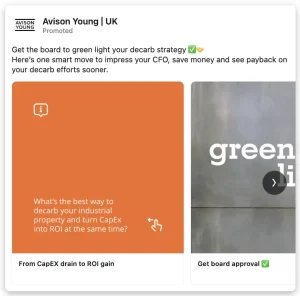
Best for: Telling your audience a story and giving them a reason to engage with the ad itself. However, each card in a carousel needs to offer something. If you’re just stretching one message thinly, it will likely lose to the single-image format.
Requirements: Carousel Ads specifications…
Video Ads
Video that autoplays in the feed. Ideal for demos, customer stories, or anything where showing is likely to work better than telling. Remember that most people watch with the sound off, so design for silence: captions, on-screen text, early brand introduction.
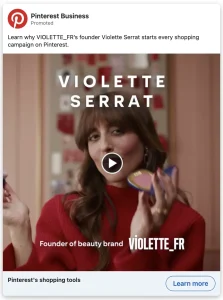
Best for: Consideration (but can also be good for awareness). Video ads are really good at moving a user from knowing who you are to understanding what you do. Video takes more time and effort to produce, so be careful to understand where it’s worth the investment.
Requirements: Video Ads specifications…
Document Ads
These put a PDF straight in the feed, so people can read or download it without leaving LinkedIn. Think research reports, guides, one-pagers, checklists, that sort of thing. And if implemented correctly, they can be one of the most effective B2B formats on the platform. Lead with value, not the hard sell.
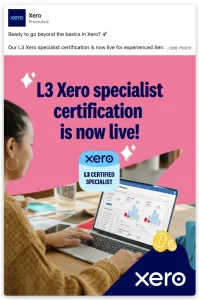
Best for: Lead generation. You’re most likely to see success pairing a helpful and eye-catching document with a Lead Gen Form. It’s a low-friction way to capture demand and interest.
Requirements: Document Ads specifications…
Thought Leader Ads
Rather than promoting a post from your company page – less and less effective as the years pass by – Thought Leader Ads let you sponsor an organic post from an individual, usually a founder or subject matter expert.
Founder and employee content is increasingly popular and can work really well. And it works for a simple reason: people trust people more than they trust faceless logos.
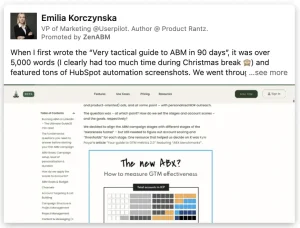
Best for: Building credibility and warming up an audience across the whole buyer journey. It’s one of the fastest-growing formats on LinkedIn (just go and see), and it deserves a proper strategy of its own.
Requirements: Thought Leader Ads specifications…
Event Ads
These are purpose-built for promoting a LinkedIn Event, be it a webinar, a live session or something in-person. They pull the event details in automatically, making registration simple and frictionless.
Best for: This one’s pretty obvious. If you’re running an event and want to fill seats – virtual or real – this is the ad format to consider.
Requirements: Event Ads specifications…
Click-to-Message Ads
Click-to-Message Ads are a newer arrival. The call to action opens a pre-filled LinkedIn message, so an interested prospect can start a conversation with you or your team easily.
Best for: Trying to shorten the gap between interest and contact. This could be particularly useful for high-consideration services where personal outreach is more valuable than a form fill. These are still finding their feet and are fairly rare, but are worth consideration if your business is more conversational.
Requirements: Click-to-Message Ads specifications…
Family 2: Sponsored Messaging
Sponsored Messaging delivers your ad straight to a member’s LinkedIn inbox, sliding in there only when they’re active on the platform. So, there’s the potential for high visibility. But you need to get it right; inbox space is personal, and overt sales messages can be jarring.
There’s also an important regulatory caveat: for audiences in the UK and EU, members have to opt in to receive Sponsored Messaging. That consent requirement can have a big impact on your reachable audience, so you’ll need to factor it in before building a campaign around sponsored messaging.
Message Ads
Very simply, a single, direct message with one clear call to action. These are, in many ways, similar to cold email outreach, only delivered natively.
Best for: A focused, single-offer nudge to a tightly defined audience. Crucial here is keeping things short and to the point and resisting the urge to send multiple links and CTAs. Focus on the objective alone.
Requirements: Message Ads specifications…
Conversation Ads
These ads are a bit like choose-your-own-adventure messaging. Your message contains multiple buttons, each leading somewhere different, like a guide, a demo booking, or the next message in the conversation. It’s a bit like a chatbot ad.
Best for: These require more setup and logic than simple Message Ads, but they give your prospects options. They are worth testing where you have segments inside your audience that may want different things.
Requirements: Conversation Ads specifications…
Family 3: Text Ads
These are the small units that sit on the right-hand side of the feed. These only show on desktop and are, by some measure, the least glamorous ad format offered by LinkedIn.
But they also have their place. They are cheap, are backed by the same industry-leading targeting as every other format on LinkedIn, and they provide a low-cost extra touchpoint.
Best for: These aren’t what you hang your ad campaign on. But they are good for staying visible without heavy creative production or ad costs. Use them for reinforcement.
Requirements: Text Ads specifications…
Family 4: Dynamic Ads
Dynamic Ads sit alongside Text Ads to the right of the feed on desktop, but they go one step further: they pull in the user’s own profile data – name, picture – enabling ad personalisation.
Spotlight Ads
These are personalised ads that drive traffic to a destination of your choice, be it a landing page, a product, or an event. If done properly, the dynamic touch can be eye-catching and scroll-stopping.
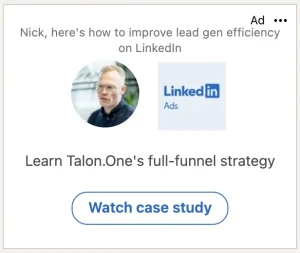
Best for: These are great for pointing a warm, desktop-heavy audience towards a specific action. Emphasis on the desktop-only limit, given how much of LinkedIn’s usage is now mobile.
Requirements: Spotlight Ads specifications…
Follower Ads
The same personalised format, but pointed at the single goal of growing your company page’s follower count.
Best for: These are good for slow-burn brand-building and audience growth, not direct response. These shouldn’t be at the top of your list if your objective is lead-focused.
Requirements: Follower Ads specifications…
LinkedIn Lead Gen Forms
Let’s clear one thing up: Lead Gen Forms are not a standalone ad format. Instead, they’re an add-on that attaches to other formats – Single Image, Carousel, Video, Document, Message Ads – and gives you the option to present the user with a form that pre-fills with their LinkedIn profile data.
Lead Gen Forms are worth considering because they are native. They give you the opportunity to remove any friction from sending a user to a landing page. And you get access to clean data directly from LinkedIn.
Best for: Any lead generation campaign where speed of capture matters. But there is a trade-off: a two-tap form tends to bring in higher volume at lower intent, so keep an eye on lead quality and qualify accordingly.
Requirements: Lead Gen Forms specifications…
The other pitfall is the data itself. Often, LinkedIn users have signed up with a personal address, so with prefilled forms you’re more likely to end up with Gmail addresses etc.
As with anything, Lead Gen Forms are worth testing. What may work well for one audience may not for another. Find what works best for you.
How to Choose the Right LinkedIn Ad Format
Ok, so now we’ve got all that nailed down; let’s return to where we started. The format is not a decision you make first; work backwards from your objective.
If your goal is awareness — getting on the radar of your audience — Single Image and Video Ads in Sponsored Content are the best place to start, and Thought Leader Ads can be used to add a layer of credibility.
If your goal is consideration – moving people from ‘aware’ to ‘interested’ – this is where Video, Document and Carousel Ads are best deployed. These give your audience something of substance to engage with, deepening their education about your brand.
If your goal is conversion or lead generation, Document and Single Image Ads paired with a Lead Gen Form are worthwhile to test. And where a conversation suits better than data collection, consider the Click-to-Message and Conversation formats.
We haven’t yet mentioned text and dynamic ads. These aren’t formats you would hang a campaign or part of a campaign from. Instead, they are there in support and, provided you have the budget, they can be used to reinforce a message to a desktop audience.
Comparison Table: LinkedIn Ad Formats at a Glance
| Format | Best for | Funnel stage | Where it shows | Lead Gen Form? |
|---|---|---|---|---|
| Single Image | Versatile all-rounder | All | Feed | Yes |
| Carousel | Sequential stories, multiple services | Awareness–Consideration | Feed | Yes |
| Video | Demos, stories, showing, not telling | Consideration | Feed | Yes |
| Document | Sharing gated value (reports, guides) | Consideration–Conversion | Feed | Yes |
| Thought Leader | Credibility via real voices | All | Feed | No |
| Event | Filling webinar/event seats | Consideration | Feed | No |
| Click-to-Message | Starting conversations | Consideration–Conversion | Feed | No |
| Message Ads | Single-offer inbox nudge | Consideration–Conversion | Inbox | Yes |
| Conversation | Routing prospects by intent | Consideration–Conversion | Inbox | Yes |
| Text Ads | Low-cost extra touchpoint | Awareness | Right rail (desktop) | No |
| Spotlight | Driving traffic to a destination | Consideration | Right rail (desktop) | No |
| Follower | Growing your company page | Awareness | Right rail (desktop) | No |
The Format Is the Last Decision, Not the First
If you take one thing from all of this, make it this: be dispassionate about LinkedIn ad formats (it’s hard, we know). It doesn’t help to have a favourite.
Every format on this list is useful for something, and rubbish for something else. Just because you’re using the fanciest in-feed format doesn’t mean you’re getting the best results. Instead, match a clear objective to the format that serves it, then worry about the copy and creative.
The format always follows.
Photo by MARIOLA GROBELSKA on Unsplash