
Thought Leader Ads let you put paid reach behind posts from real people on LinkedIn. Below, we cover how they work and when we think they’re worth the money.
Your MD posted something on LinkedIn last week. It was a clear and thought-provoking opinion on a problem your clients are dealing with right now, and it got a few dozen comments. Even better: a few of those came from people at companies you’d love to work with.
The same week, your Company Page shared the same idea as a branded graphic. It got a handful of likes. Most, if not all, of them were from your own team.
Thought Leader Ads let you pay to show that first post to more of the right people. It still appears under your MD’s name and photo, and you get to define the audience.
Organic reach and valuable engagement on LinkedIn are harder than they have ever been. That’s why we recommend Thought Leader Ads, especially for B2B brands with long sales cycles.
But they’re easy to get wrong. Judged purely on direct cost per lead, they’ll look expensive, and you’ll probably switch them off too early. Their job is different. It’s to get your most visible employees known by buyers before those buyers are ready to talk to you. So, measure them on reach and engagement, and on campaign uplift elsewhere.
(Our founder-led content guide covers a similar idea. Think of this as the B2B version for LinkedIn.)
What Are LinkedIn Thought Leader Ads?
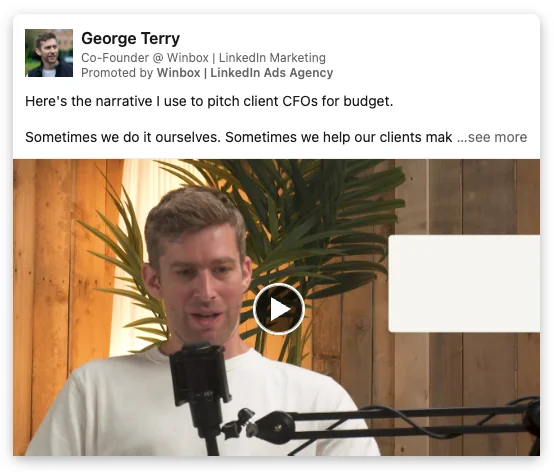
Thought Leader Ads are sponsored posts that run directly from a person’s LinkedIn profile instead of a Company Page. You take a post someone has already published (with their permission) and pay to put it in front of an audience you define. You might also see them called thought leadership ads; it’s all the same thing.
The post keeps the author’s name and photo. According to LinkedIn, the author also sees the organic and paid results together on their post.
How They Differ from a Normal Sponsored Post
Thought Leader Ads sit in the same feed as any other Sponsored Content and benefit from the same targeting functionality. The difference is who’s in control. LinkedIn’s specs page says you can’t add a headline or intro text, and you can’t edit the post. Only the author can.
There’s no CTA button or URL field either, although any link the author put in the original post still works. The author also retains control of the ad itself. They approve every request, and they can withdraw permission whenever they like, stopping the ad from running.
Raise this early. Your MD’s first reaction might be “I don’t want my post turned into an ad I can’t control”. You can reassure them they keep control the whole time.
What’s Changed Since They Launched?
When LinkedIn launched Thought Leader Ads in 2023, you could only sponsor posts from your own employees. That changed in March 2024, when LinkedIn opened them up to posts from any member, including clients, partners, and industry experts.
You find posts by searching for 1st- and 2nd-degree connections by name, or by pasting in a post’s URL. Event posts, articles, and newsletters have been added since then.
And in June 2026, LinkedIn launched Creator Marketplace inside Campaign Manager. It lets brands search vetted creators by topic, and it’s the only way to search for posts from people beyond your 2nd-degree connections. For now, though, it’s an invite-only alpha for brands and creators in the US and Canada, with English-only content.
So as a UK brand, you’ll be sponsoring people you already know, whether that’s someone in your own team or a client. They’re really quite flexible.
Why Thought Leader Ads Work
As you’re probably aware, most B2B purchases involve a buying committee much larger than the group your sales team ever speaks to.
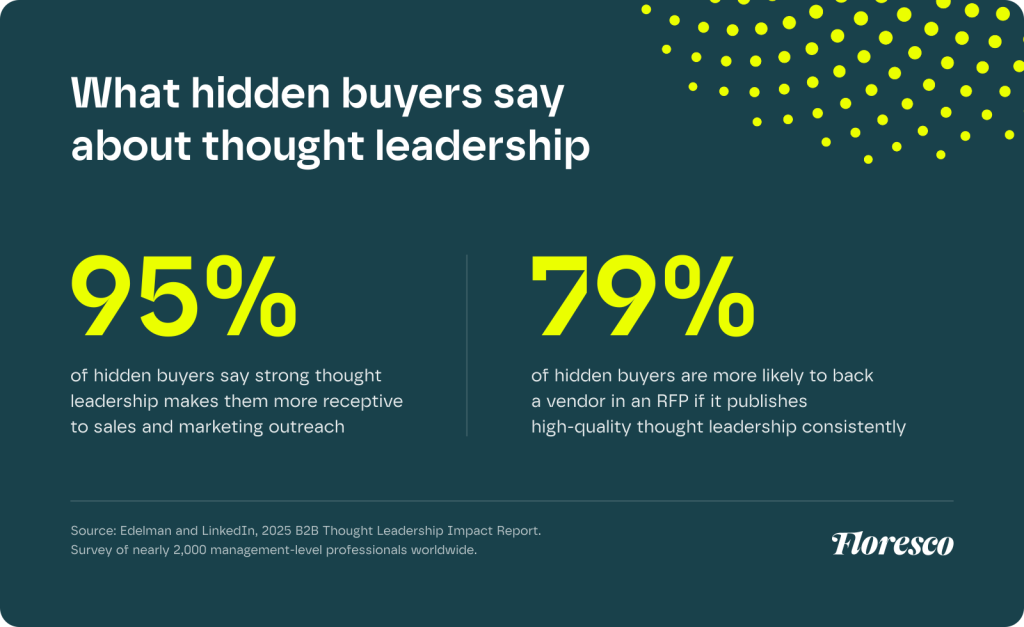
Edelman and LinkedIn looked at that group in their 2025 B2B Thought Leadership Impact Report, which surveyed nearly 2,000 management-level professionals worldwide.
The report calls them “hidden buyers”, meaning people who influence a purchase without being the obvious person to target. It found that 95% of hidden buyers say strong thought leadership makes them more receptive to sales and marketing outreach. And 79% say they’re more likely to back a vendor in an RFP if it publishes high-quality thought leadership consistently.
We made a similar case in B2B Ads Don’t Need to Be Boring. Business buyers are still people, and a post from someone with a name and a face resonates much more strongly than something from a faceless logo.
And LinkedIn’s own figures point much the same way. In a pilot with early testers between February and April 2023, Thought Leader Ads had a 1.7x higher click-through rate and a 1.6x higher engagement rate than other single-image campaigns.
What Can You Promote with Thought Leader Ads?
| Post type | Can you sponsor it? | Objectives | CTA button? |
|---|---|---|---|
| Text-only or single image post | Yes | Brand awareness, engagement | No |
| Video post | Yes | Brand awareness, engagement, video views | No |
| Event post | Yes | Brand awareness, engagement | Yes |
| Article or newsletter published on LinkedIn | Yes | Brand awareness, engagement | No |
| Document, poll, multi-image or carousel post | No | – | – |
| Celebration, reshare or post shared to a group | No | – | – |
Sources: LinkedIn’s Help Center, product page, and specs page.
There’s no lead generation or website conversion option, and only event posts get a button. Thought Leader Ads are built for reach and trust, so to generate leads as well, you’ll need to run them alongside other formats (more on that below).
Our guide to LinkedIn ad formats shows where thought leadership ads sit in the rest of LinkedIn’s format line-up.
A Note for UK Brands with EU-Based Leaders
According to LinkedIn, posts from authors in countries covered by the EU’s Digital Markets Act can’t currently be found or used as Thought Leader Ads. The UK isn’t covered, so UK-based authors are fine. But for an MD based in Dublin or a subject expert working from Amsterdam, check before you build a campaign around them.
How to Set Up LinkedIn Thought Leader Ads
To get started setting up your own Thought Leader Ads, you’ll need access to your company’s LinkedIn Page and a Campaign Manager ad account linked to it. An ad account linked to a Showcase Page still ties the ad to the parent company Page.
Setup is very quick:
- In Campaign Manager, create a campaign with the brand awareness or engagement objective (or video views, for a video post).
- Choose the ad format that matches the post: single image, video, event, or article and newsletter.
- Select Browse existing content, then choose LinkedIn members as the source.
- Find the post. Search for an employee or connection by name.
- Send a sponsorship request. The author gets a notification and can approve or decline.
- Once it’s approved, add it to your campaign, set your audience and budget, and launch.
Before you launch, ask the author to note down their organic numbers. LinkedIn recommends it, and it’s the easiest way to see what the paid reach added. LinkedIn also suggests sponsoring posts that are less than 30 days old, so the content still feels current.
Turn On Auto-Approval
When an author gets a request, they can approve that one post or turn on auto-approval for your company, which covers future requests too.
Our recommendation is to ask your regular posters to switch it on. It saves a lot of chasing, and it means you can sponsor a strong post while it’s still getting traction.
Get Your Disclosures Right
LinkedIn shows readers which company is promoting a Thought Leader Ad, so it’s clear the post is paid for.
Paying someone outside the business to write or publish the post is different. Under UK advertising rules, that post counts as an ad in its own right, so it needs to be clearly labelled as one. The ASA’s guide to making clear that ads are ads explains what that looks like.
For employees, check that their LinkedIn headline shows where they work. Anyone who sees the ad can then make the connection straight away.
How Much Do Thought Leader Ads Cost?
There’s no separate price list for these ads. Thought Leader Ads are Sponsored Content, so you bid in the same auction as every other feed ad. What you pay depends on who you’re targeting and how you bid.
The most useful recent benchmark comes from ZenABM’s 2026 benchmarks report, which looked at 161,256 LinkedIn ads from 211 B2B companies across 29 countries. Here’s how Thought Leader Ads compared with single image ads:
| Median figure | Thought Leader Ads | Single image ads |
|---|---|---|
| Click-through rate | 2.68% | 0.42% |
| Cost per click | $2.29 | $13.23 |
| Cost per 1,000 impressions (CPM) | $49.37 | $59.15 |
Source: ZenABM 2026 LinkedIn ABM Benchmarks Report (161,256 ads, 211 B2B companies, 29 countries). Figures in US dollars.
Be aware that there’s a catch in that click-through rate. It counts every click on the post, including the ones that never leave LinkedIn. Once you only count clicks through to a landing page, Thought Leader Ads drop to 0.29%. Even then, ZenABM puts the cost per landing page click at $3.06, which is still well below single image ads.
In plain English, you’ll usually pay a bit less per impression and a lot less per click. But most of those clicks are people engaging with the post, so don’t expect Thought Leader Ads to fill your pipeline. At least, not on their own.
Finally, the figures are in US dollars and come from a global dataset, so UK costs will be different. Use them to compare formats, then check your own account for UK prices.
Are LinkedIn Thought Leader Ads Worth It?
Well… that all depends on your business and what you need them to do.
By the way, all of this assumes someone in the business already posts regularly and has something worth saying. Without that, there’s nothing to sponsor.
When to Use Them
- Your sales cycle is long, and several people sign off on a purchase. Those are the hidden buyers from the Edelman research, and this is how you reach them.
- You sell professional services, where clients are buying the people as much as the firm. For firms that come out as a mixed fit on the checklist in Do LinkedIn Ads Work for Professional Services?, this is the format we’d start with.
- You’re launching a new service or moving into a new market, and nobody knows your name yet. It’s easier to get known through a person people can follow.
- You’re running an event. Event posts get a registration button, so you can drive sign-ups directly even with Thought Leader Ads.
When to Use Something Else
- You need lead volume fast, and you don’t have a warm audience. Consider starting with Lead Gen Form campaigns and running Thought Leader Ads alongside them to build next quarter’s audience.
- Nobody posts consistently. Sort out the posting habit first, because one ghostwritten post won’t give you much to work with.
- The posts read like sales copy. People will treat them like any other ad, so you’re better off with a standard format, where you at least get a headline and a button.
“The most common mistake we see is judging Thought Leader Ads on cost per lead. They’re there to get your people known by the buyers who aren’t in conversation with you yet. So we would typically plan them alongside lead generation from the get-go, and we judge them on what they do for those campaigns. The uplift we see. ”

Harriet Barter
Co-Founder, Floresco Media
How We Get More from Thought Leader Ads
We run Thought Leader Ads for clients as part of our LinkedIn Ads service. Here’s what we’d tell anyone just starting out with the format.
Start Organic, Then Sponsor What’s Working
Let a post run organically for a few days first. Then sponsor the ones that are already getting comments from the right people. It’s the same approach we recommend for founder content on Meta in our founder-led content guide.
Use More Than One Voice
Don’t rely on the CEO alone. Your technical lead or a client director will reach different people, and spreading the posting around helps you avoid founder fatigue. Cognism’s head of paid acquisition told LinkedIn that sponsoring every employee’s posts gave them a steady supply of content to promote, along with a higher CTR and a lower CPC.
Retarget the People They Reach
Thought Leader Ads build an audience of people who’ve engaged with your team’s ideas. Retarget them with formats that do have a CTA, such as Document Ads with a Lead Gen Form. Our LinkedIn ad formats guide covers which formats work best for that next step.
Measure Them Like an Awareness Format
Judge them on reach, frequency, engagement rate, and cost per engagement. Then look at what happens next. Are your retargeting audiences growing? Are your lead gen campaigns getting cheaper, or bringing in better leads, now that Thought Leader Ads are running alongside them?
How to Get Started with Thought Leader Ads
Start small. Pick one or two people who already post, then choose three posts to sponsor first:
- A clear opinion on something your buyers are dealing with right now.
- A practical lesson from client work, shared with the client’s permission.
- An event post, so you get a registration button.
- Run them to a tightly defined audience for a month. Then compare the results with your Company Page ads, using the awareness measures above.
Get Help with Your LinkedIn Ads
Someone on your team may already be posting and getting the right people in the comments. It’s worth testing what some budget behind those posts can do.
We plan Thought Leader Ads alongside the rest of a client’s LinkedIn activity, including lead generation and retargeting. For a second opinion on where they’d fit in your account, get in touch and we’ll take a look. You can also find out more about our LinkedIn Ads service.